| |
DSL line stats from your modem or router can be a useful tool to aid troubleshooting adsl problems and line faults. Some users may just wish to know what the figures mean, or if they can use this information to give a rough guide as to whether or not your line can cope with higher speeds.
~ What are adsl line stats?
Line stats are a set of various figures that can give some indication about the status and condition of your adsl connection.
When using your linestats as a diagnostic tool you have to look at all the figures and not just rely on say just the sync speed or SNR Margin.
When looking at your linestats, you generally need to look at the downstream figures. |

|

~ How do I get my line stats?
Most adsl modems or routers will provide you with your dsl line stats.
I maintain a list of instructions for the most commonly used adsl modems and routers, which will help you find the figures you need.
- See How to get adsl line stats from your router. |
|
| Your ISP will also be able to get your line stats by performing something called a WOOSH test which will advise them your loop loss (attenuation) and SNR Margin. However, due to the time element involved, most ISPs are very reluctant to perform this test unless it is specifically in relation to an adsl fault. |

|
A BT Openreach adsl faults engineer will also be able to access your line stats by hooking up his equipment to your line.
|
~ Which figures do I need to look for?
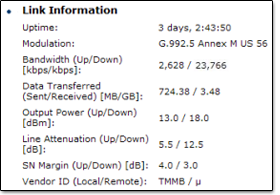
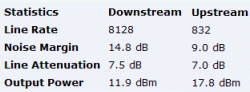
Various makes of routers may name the figures slightly differently, but the important figures that you are looking for should be something similar to:
|
- Connection or Sync Speed or Rate
- Attenuation or Atten or Loop Loss
- SNR Margin or Noise Margin or Noise or Margin
- Details of any CRC/HEC/RS/FEC errors and Errored Seconds may also be helpful.
|
 |
For fault diagnostics, someone who is experienced in reading line stats will also look at other figures such as Power, and will also look at the different types of errors in comparison to uptime.
The later mentioned figures aren't something that can really be defined, because it depends on all of the line variables and is something that only really comes with experience after reading many line stats.
Not all modems/routers will display some of the more detailed stats, but most will show the important ones which are listed above.
|
~ What is "Sync Speed"?
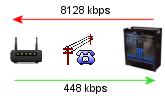
This is the speed at which your router synchronises (connects) to the exchange equipment. Depending upon your ISP, your sync speed can either be Fixed Rate or Rate Adaptive.
Fixed Rate lines are generally 512kbps, 1Mb or 2Mb and these have corresponding sync speeds of 576kbps, 1152kbps and 2272kbps respectively. |
|
Rate Adaptive lines will sync at the best speed they can for the length and condition of your line, therefore its not unusual to see slightly different sync speeds if you reboot your router. DSLMax, ADSL2+ and LLU are usually rate adaptive.
It is important to remember that the sync speed at which you connect is not your "real speed" that you will be able to download at, as it has an inbuilt allowance to allow for such things as TCP/IP overheads.
For example a line syncing at 8128 kbps could expect to see a maximum throughput speed of around 7.1Mb (approx 13% for overheads).
|
~ What is Attenuation?
Line attenuation is in relation to the "loop loss" on your
line. The lower this figure the better, and the better chance you have of getting the faster speeds.
Attenuation is a term used to describe the reduction of the adsl signal strength that occurs on the copper pair over distance and is measured in dB decibels. The further you are from the exchange, the higher your attenuation
figure will be as the signal loss increases. |

|
Attenuation is logarithmic and each 3dB of attenuation halves the strength of the signal power received, therefore a line with 30dB of attenuation only receives 1/1,000th of the power, whilst a 60dB line would only receive 1/1,000,000th.
Attenuation also depends on the quality and gauge of cable on your line, but a rough guide is 13.5dB - 14dB of loss per km.
True line attenuation - or Insertion Loss - can be measured at the DSLAM at the exchange via diagnostic tests and this figure should remain fairly static. Our routers can give us an indication of how much the signal is attenuated as an average against all the frequencies that it uses.
Because the router measures against the frequencies available, some users may notice a very slight increase in attenuation if say moving from a fixed rate 512 kb connection up to 2Mb.
Higher frequencies such as those used to transmit faster speeds are more likely to be attenuated (higher frequencies = higher attenuation).
ADSL 2+ has an increased frequency spectrum, therefore an increased attenuation of around 3-4dB is not unusual. As a very rough guide a speed increase of 4Mb is said to increase the attenuation by 1dB.
It is also important to note that different routers may load the frequency bins in slightly different ways, and on top of that some routers report the average across the frequencies actually in use, whilst some may report the average across the frequencies available - which is why sometimes using a different router may report a slightly different attenuation figures.
To confuse matters further, there are a few routers which record the insertion loss measured at 300 kHz as being the downstream attenuation figure. Obviously those routers are unlikely to show attenuation changes as the speed range increases. The reason why, is that insertion loss or attenuation measured at 300kHz can be used as a very good guide to calculate the loop length and line capacity.
~ What is the difference between Line Attenuation and Signal Attenuation?
Routers that display two sets of attenuation figures are usually reporting the Signal Attenuation and Line Attenuation. In these cases it can be taken to mean:-
- Line (or Loop) Attenuation is an average of all the tones available for use in the relevant dsl spectrum - regardless of if the tones are in use or not.
Loop attenuation is calculated during the transceiver training phase of the initialisation process and is an estimation of the line attenuation averaged through all the upstream or downstream subcarriers.
- Signal Attenuation is monitored and reported as an ongoing process and can sometimes be affected by ongoing changes in line conditions. Calculation is performed as the difference between the power transmitted at the far end and the power received at the near end.
Signal attenuation is based an average of the frequency bins in use during showtime and therefore it is not considered unusual if Signal attenuation is slightly lower than Line attenuation.
|
~ What is SNR?
SNR is Signal to Noise Ratio - in other words a measurement in decibels of the Signal strength to the level of Noise on the line.
The higher your SNR is, the better, as there is less background Noise. |
|
SNR fluctuates on all lines throughout the course of the day by various amounts. Signal strength is usually best during the early part of the day. During the evenings "Noise" often occurs due to more people being at home and turning on electrical equipment etc. Electromagnetic Noise can be introduced on your line from various sources around your home and neighbouring area.
The list of sources for noise is practically endless, but common culprits could be TVs, PCs, lighting, heating, pumps etc. There's also something called "cross talk" which is a small amount interference picked up on your line from other users adsl connections between the home and the exchange.
A simple analogy of SNR is: |
Imagine you are stood in a large empty room and you speak to someone at the far side of the room. In normal circumstances the other person would be able to hear your voice (Signal) quite clearly.
Now turn on some background music (Noise) and your friend cant hear what your are saying quite so well, so you have to talk even louder (turn up the signal strength) for your friend to hear properly. As the music volume is turned up this introduces more noise which decreases the SNR.
Because your friend is now struggling to hear what you say, they move next to you so they can hear you better.
Now imagine the same room being full of lots of people, each having their own conversation. The buzz of everyone else's conversation makes it harder still for you and your friend to hear each other through the noise (cross talk). |
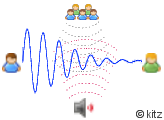 |
So to convert the analogy to adsl. 'You' are the DSLAM at the exchange and 'your voice' is the dsl signal. 'Your friend' is the router in your home listening to the signal. The 'Music' is general background noise from various electromagnetic sources. The 'crowds conversation' is everyone else's dsl connection.
Your friend being able to hear you better stood next to you rather than at the far side of the room equates to distance between your home and the exchange - the further away from the exchange you live the more the signal deteriorates and becomes more susceptible to noise picked up along the way.
Each line needs a specific amount of SNR to run at a given speed. Very roughly its often said that 1dB of SNR equates to 450kbps of speed, but other factors such as attenuation and output power need be bourne in mind and some lines may only see around 1Mb per 3dB.
|
~ What is SNR Margin?
|
Whilst SNR Margin and SNR are related, they are not the same thing.
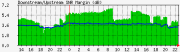
SNR Margin could be thought of as a "buffer zone" which is there to protect your connection against normal SNR fluctuations that can and do occur on a daily basis. |
|
Consumer routers usually show the SNR Margin and not the SNR value regardless of the display name.
Depending on the manufacturer this may be "Receive Margin", "SNR", "Noise" or any variation of these.
It may also be abbreviated to SNRM or Noise Margin.
The SNR Margin is the difference between the actual SNR and the SNR required to run at a specific speed. For example, if your line needs 35dB of SNR to run at 8Mbps, and the actual line SNR is 41dB, then the SNR Margin would be 6dB.
Its perfectly normal for your SNR Margin to fluctuate during the course of the day, and its most likely to be at its lowest during the evenings.
If your SNR Margin is too low this may lead to slower throughput or frequent disconnections.
Looking at your SNR Margin figure can often be a useful diagnostic for adsl faults. Attenuation and SNR Margin are independent figures and its possible to have a good attenuation, but poor SNRM - or vice versa.
|
~ What is Target SNR Margin (TNMR)?
If you are on a rate adaptive "up to 8Mb" connection (such as MaxDSL or LLU) then Target Noise Margin plays an important role during the synchronisation process between your router and the DSLAM at the exchange.
Target SNRM affects the speed at which we sync at and sets the initial SNR Margin "buffer zone". You should be able to get a rough idea of your Target Noise Margin by looking at your linestats immediately after a resync. |
 |
During the sync process the DSLAM and router negotiate a sync speed based on the various conditions of your line, allowing "spare SNR" for normal fluctuations.
With the rate adaptive products, profiles that can be typically set are 6dB, 9dB, 12dB or 15dB -with 6dB being the default. Longer lines are more susceptible to noise and therefore often require a larger margin than shorter lines.
Its important to note that on very good lines which would be able to sync in excess of 8Mb and which are currently syncing at 8128 or 7616 will show the SNR Margin as being higher due to the line not having reached its full potential. Such lines may well have the output power reduced in order to minimise crosstalk for other connections, therefore the SNRM figure is not an indication of the true target in these particular cases.
Fixed rate lines don't have a target SNRM as such. The line is set to connect at the fixed speed without any negotiation of line rate, therefore they will either connect at the fixed speed or wont connect at all if the SNR is too low.
Whilst Target Noise Margin is the correct term, it is often referred to as Target SNRM or the Target SNR.
|
~ How fast should my connection go? (DSL Max & LLU).
This entirely depends on your distance from the exchange and the condition of your telephone line.
|
| BTw maintains a database of estimated maximum speeds based on averages for your local area. You can check what the BTw database says about your line by putting your telephone no and postcode into the adsl line checker.
However, the BTw database is very often conservative and sometimes is even wrong. |
 |
You can also get a rough indication based on your line attenuation. To do this use the site's Maximum Speed Calculator.
Please note that this is based on an average gauge line in good condition and obviously cannot account for local issues such as faulty internal wiring or electromagnetic interference.
|
~ What are BT's Fixed Rate limitations?
Ideally your line length should be below 3.5km from the exchange
to get a fixed rate 2Mb connection and 6km for a 1Mb connection.*
Some older adsl connections may still be on a fixed rate line, or there some instances where long lines which have large SNR fluctuations don't perform too well on the "up to 8Mb" type accounts and can be moved back to a Fixed Rate Line.
| Attenuation |
Fixed Rate Line |
Sync
Down |
Sync
Up |
Equivalent
Max - Capped Rate |
| |
|
|
|
|
| > 60dB |
512 kbps |
576 |
64-288 |
Profile 500 |
| 43 - 60 dB |
1 Mbps |
1152 |
288 |
Profile 1000 |
| <= 42 dB |
2 Mbps |
2272 |
288 |
Profile 2000 |
| |
|
|
|
|
If you already have adsl enabled you may be able to add an extra
couple of dB on those figures e.g. 44 dB would be the limit for a
fixed 2Mb line. However, since Aug 2005 BT have adhered to the rules more
strictly due to a large number of failed 2Mb upgrades that
had to be regraded back down to 1Mb.
There is a supposed "soft cap" for adsl of about 70dB, but BTw will try connect
anything up to 75dB attenuation.
*The new reach limits came into effect on the 6th
of September 2004. Prior to this date the limits were 6km for a rate
adaptive product (512k) and 3km for a fixed product (1 & 2Mb).
~ Improving your Line Stats.
Many people have asked if there's anything that can be done to improve
your line stats.
There isn't much you can do about attenuation,
because that is largely dependant upon line length, and the amount of copper in/or joints on your line.
However there are a few
things that may help improve your SNR Margin. Rate adaptive products such as the "up to 8Mb" maxdsl and LLU rely much more heavily on SNR Margin to attain the best possible speed so its well worth checking out to see if you can improve your connection speed.
~ 63.5 dB Attenuation?
The reason some routers/modems will report 63.5 dB
as the maximum attenuation isn't actually a bug. In fact its from
the G.992.1 standard which quotes the recommended test parameter to be "The attenuation ranges from
0 to 63.5 dB with 0.5 dB steps."
As such many firmware versions have taken this literally and only
go up to 63.5dB when it is possible to have a higher attenuation
figure than this. If your router is displaying 63.5dB, then there's a chance that your attenuation may in reality be higher.
~ What do the other figures mean?
Different routers may also display various other data about your connection. Information and explanations about some of the other figures are explained on the following pages:-
|
|



 Rate your ISP