 |
|
 |
 |
Support this site |
 |
 Rate your ISP
|
 |
|
 |
 |
ADSL - How adsl Works - 1 |
 |
|||||||||||||||||||
|
|||||||||||||||||||||
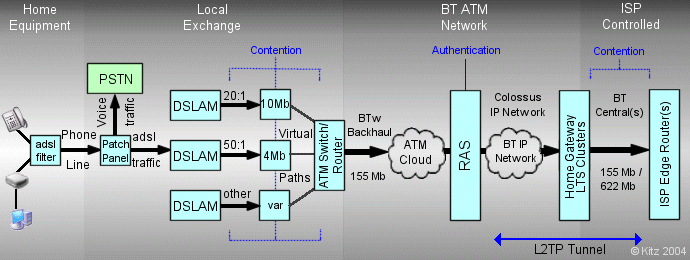
| Separates the analogue voice (phone) traffic from data (adsl)
traffic. Normal voice (phone) traffic is at a lower frequency (< 4 KHz) than adsl data. The "telephone" outlet on the splitter blocks the higher frequency signals which prevents the data signals from interfering with voice calls. A splitter must be used for each telephone device that is connected to the socket. More information about adsl filters. |
 |
| Transceiver to connect the adsl line to the computer, or in
the case of a router to the local network. Depending on the type of router, it can either be connected to a network switch/hub or it may have its own networking switch. The modem converts digital signals from your PC/Network into analog signals that can be transmitted over telephone cable in the local loop and vice versa. |
 |
Local Loop
This is the path your telephone line will take from your
house to the local exchange. "Green CABs" or more correctly PCP boxes, are a
junction point where the telegraph pole or underground cable
joins a larger link back to the exchange. BT has about 4.7 million distribution points,
five million joint boxes, 47 million telegraph poles, 210,000
manholes, 98,000 PCP green cabinets and 5,500 exchange buildings with 25 million exchanges lines
BT's access network contains 121.7 million kilometres of copper
wire, enough to go around the world about 3,000 times.
|
 |
Local Exchange Equipment.
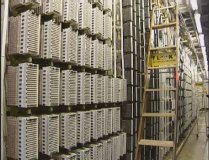
Entering the adsl section at the local exchange, one of the first things you cant help but notice was the huge amounts of patch panels. All lines that are adsl enabled will be attached to an adsl patch panel on the exchange side of the Main Distribution Frame (MDF). These patch panels are are stacked in racks from floor to ceiling and grouped in batches of 96/100 users and marked with the DSLAM it is attached to. ADSL patch panels are attached to the Exchange side of the MDF (Main Distribution Frame) on the right and out to the DSLAM line card on the left. |
 |
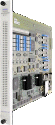
Form part of the DSLAM, and are "slotted"
in.
With older dslams it was assumed that the line cards set your maximum speed is set by using jumpers to set the max speed. (say 2Mb). Actual line sync speed up to this maximum can be set remotely by BTw (576 kbps/1152 kbps/2272 kbps). Integrated line cards filter adsl and POTs traffic and newer technology allows more flexibility for remote management to set speeds or IPStream ISP migration without an engineers visit. |
 |
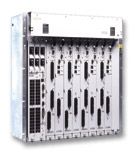
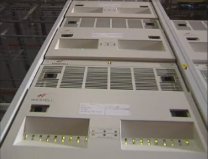
| Takes connections from a number of users and concentrates them into a higher capacity connection along the ATM backbone. The DSLAM is behind a storage cabinet and there is not much that you can really see, but it is basically made up of numerous circuit boards. The DSLAM has a number of line cards, each line card itself holding connections from several users. Typically a 3rd generation DSLAM will take 2 racks of 16 cards giving an overall 'port' capacity of 768 circuits. However the type of DSLAMs installed may vary from exchange to exchange, and some makes of 4th generation units by Fujitsu may initially support up to 1024 lines. (This figure can later be doubled by adding another ETSI rack ). DSLAM's segment traffic into several Virtual Paths before forwarding to the ATM, most DSLAMs will control several VP's. When an exchange is said to be low on port capacity it means that the exchange is running close to the maximum number of users that can be attached to the line cards on the DSLAM. |
|

Exchange Backhaul
BTw commonly talk about VPs which are "virtual"
paths or routes from the DSLAM, over the ATM backhaul. Depending upon the size of the exchange, an IPStream VP will
be made up of a hundred or so customers who are a mix of various
IPStream ISPs. BTw are responsible for monitoring and running
the capacity on the VP. 20:1 Office and 50:1 Home users are
routed via separate VPs. |
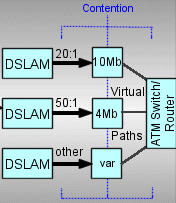 |
In 2003/2004 newly enabled exchanges* which required
400 pre-reg users, the common set up would be as follows:- These days with the advent of higher speeds and more users having access to adsl the amount of bandwidth allocated to the VP has obviously had to be increased. Future talk is that several existing VP's will be merged into "Super VP's" with a larger amount of bandwidth and users. *This information was correct mid-end 2003,
however these figures may have now changed with the advent of
1Mb 50:1. |
|
|
|
All rights reserved
Unauthorised reproduction prohibited

|
 |
|
|

|