 |
|
 |
 |
Support this site |
 |
 Rate your ISP
|
 |
|
 |
 |
Disable Unused Ports |
 |
||||||||||||||||||
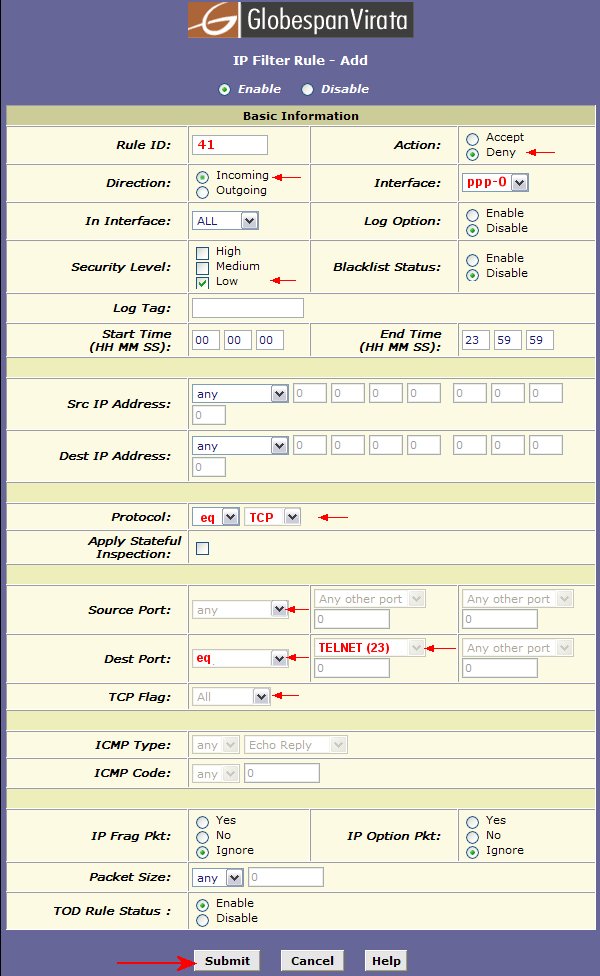
IP Filter Rule By default the router is shipped with certain ports open and it is important to close or stealth them if they are not being used. These ports are :-
The following example shows you how to stealth your telnet port.
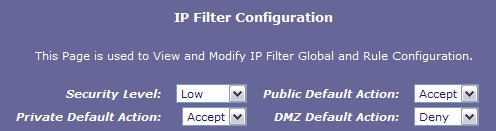
Click the submit button then make sure the IP Filter config is set as:-
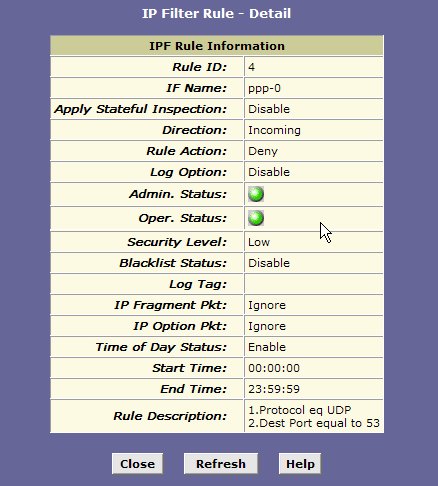
submit the changes then commit the changes in the admin tab. Update 01/04/06 It is also recommended that you disable UDP 53 incoming to prevent your router being used as an open recursive DNS server. When enabled the rule should look something like this:
|
All rights reserved
Unauthorised reproduction prohibited

|
 |
|
|

|